Garmin Messenger™
- 4.5
- Rating
- 1.00M
- Installs
- Free
- Price

 Analysis by App-foxy
When I first looked at Garmin Messenger™, I treated it less like another everyday chat app and more like a communication tool for people who already spend time outside normal mobile coverage. That distinction matters. The app is made by Garmin and sits in the communication category, but its value depends heavily on the wider Garmin setup you use. If your main need is chatting with friends who are already online through familiar services, this is probably not the most convenient place to start. If your day includes a Garmin satellite communicator and you need a practical way to keep people informed, the experience makes much more sense.
I like the basic idea because it addresses a very specific problem: what happens when a trip moves beyond dependable cellular service? A normal messaging app is excellent when both people have internet access, but it becomes much less useful when the sender is hiking through a remote valley, paddling along a quiet coastline, or working far from a town. Garmin Messenger is designed around that kind of handoff between ordinary internet messaging and Garmin’s satellite communication equipment. In my experience, understanding that workflow is more important than judging it as a direct replacement for WhatsApp, Signal, or standard SMS.
From an ordinary phone to a message beyond coverage
When I follow the route from an ordinary phone conversation to a message sent beyond reliable coverage, I focus on what makes the handoff practical rather than assuming it will feel instant. I’ll also look at how a little preparation can make delayed replies easier to handle. That sets up the next section’s closer look at the app’s everyday communication flow.
You May Also Like

 Blood Strike: 2.5 Anniversary
Blood Strike’s Loadouts Turn Every Drop Into a Tactical Gamble
A close look at Blood Strike’s custom loadouts: how fast access to signature weapons reshapes its battle royale rhythm, rewards preparation, and narrows the gap between fights.

 Pandora - Music & Podcasts
Pandora’s Music Is Easy to Start, but Harder to Recover
Pandora’s strength is its low-effort path from a seed to a station. Its weak spot is how much confidence it asks you to place in connection, setup, and quiet recovery.

 8 Ball Pool
 Is Built on Rivalries, Rematches, and Routine
A close look at the rivalries, rematches, shared routines, and unanswered safety questions that turn a quick pool match into a persistent mobile community.

 Samsung Music
’s Quiet Strength Is Playing What You Already Own
Its reach comes less from spectacle than from dependable access to a personal library. That simplicity is both the app’s strongest retention engine and its ceiling.

 AccuWeather: Weather Radar
AccuWeather Review: A Quick, Clear Forecast for Everyday Decisions
For everyday plans, the best forecast is the one you can understand quickly. AccuWeather makes rain timing, radar, and local conditions easy to act on, with a few trade-offs.

 Hill Climb Racing
Why Hill Climb Racing Still Turns Crashes Into One More Run
A tiny car, a bumpy hill and one more upgrade: Hill Climb Racing keeps resurfacing because its simple chaos makes every near-miss feel personal.
More From Our News Desk



The starting condition: deciding whether this is your kind of messenger
The first question I would ask a friend is not whether the interface looks familiar. It is whether they already have a reason to communicate through Garmin’s ecosystem. The app is free, has an Everyone age rating, and supports devices running Android 8.0 or later, so the entry point is approachable. However, the app’s most distinctive purpose is tied to Garmin’s outdoor communication hardware rather than to casual phone-to-phone conversation alone.
That makes the audience fairly clear. It is a strong fit for hikers, bikepackers, climbers, sailors, expedition teams, and family members who need reassurance from someone traveling away from reliable coverage. It can also be useful for a person at home who wants to exchange messages with a Garmin user in the field. The person receiving messages does not necessarily need to be the one carrying the outdoor device, which is an important practical advantage when a family is coordinating around one traveler.
I would not choose it as my only messaging app for a household that simply wants group chats, stickers, video calls, and effortless contact discovery. The usual alternatives are better established for those jobs. Garmin Messenger becomes interesting when the conversation has to survive a change in connection type, especially when one participant moves from cellular or Wi-Fi into a satellite-dependent environment.
Preparing the conversation before leaving
The smoothest experience starts before the trip. I would install the app, sign in, allow time to understand the contact and conversation layout, and make sure the people who may need updates know where to reach me. This preparation is not glamorous, but it prevents the common mistake of treating remote communication as something that can be improvised after the signal disappears.
A useful habit is to agree on the purpose of the conversation in advance. For example, one thread might be reserved for progress updates, while another is used for a family check-in. That separation makes the important messages easier to spot later. It also reduces the temptation to send a stream of small comments when a concise status update would be more useful and more considerate of the limitations of remote communication.
I also recommend thinking about the people on the other side of the conversation. A contact at home may be using the app over a normal internet connection, while the traveler is depending on a Garmin device and a satellite link. The same chat can therefore feel fast for one person and delayed for the other. Setting expectations before departure—such as agreeing that a reply may take time—removes a lot of unnecessary worry.
Writing the message and choosing the right moment
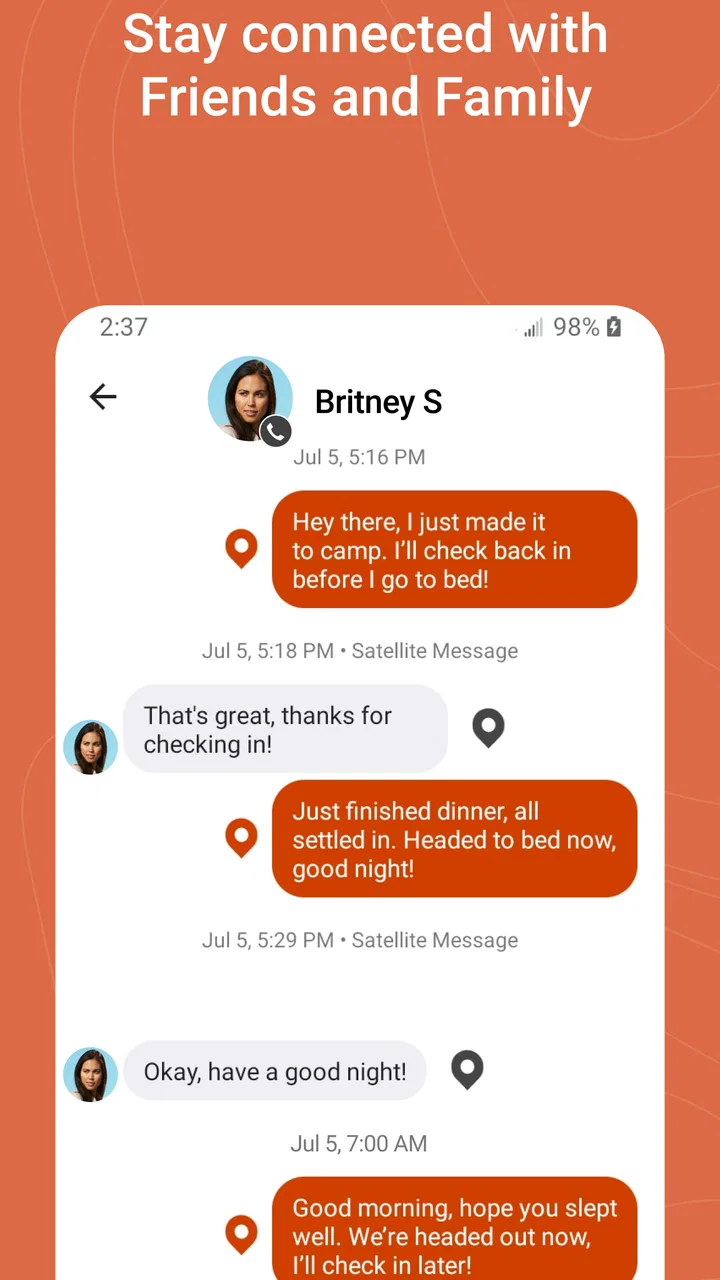
Once the conversation is ready, the basic action is familiar: open a thread, write a message, and send it. The difference appears in what happens after that action. In a conventional messenger, I usually assume the message will travel almost immediately if my phone has a connection. In a remote Garmin workflow, the message may need to move through the connected outdoor device and its available communication path.
That changes how I write. I would put the key information first rather than burying it at the end. “Reached camp, safe, moving tomorrow morning” is more useful than a long story followed by the actual status. I would also avoid sending several corrections in quick succession. A short, complete update is easier for the recipient to understand and gives the sender a clearer record of what was intended.
This is one of the app’s less obvious strengths: it encourages a more deliberate style of messaging. It is not necessarily as quick or expressive as a mainstream chat service, but that can be helpful when every exchange has a practical purpose. For a solo traveler, a message is often not just conversation; it is a check-in, a plan update, or a way to tell someone that the day is progressing normally.
The handoff between phone connectivity and Garmin equipment
The most important part of the experience is the handoff. When I am in a normal coverage area, the app can behave like a conventional internet-based messenger. When the person in the field moves outside dependable cellular service, the conversation depends on the Garmin communication setup rather than on the phone alone. That transition is the reason to use this app, but it is also where expectations need to be realistic.
The app does not make a remote environment behave like a city. A satellite-based exchange can involve more waiting and more attention to the physical situation than an ordinary chat. If the device is packed away, not connected as expected, or unable to communicate from the current surroundings, the phone interface cannot magically remove those obstacles. I see Garmin Messenger as the control point for the conversation, not as a guarantee that every message will behave like an instant mobile notification.
For the person at home, the handoff is mostly invisible when it works well. They can send a question through the conversation, and the traveler can receive it when the Garmin setup passes it along. For the traveler, the process may require more awareness: checking that the equipment is available, allowing time for transmission, and avoiding assumptions based solely on the appearance of the phone screen. That difference between the two sides is worth explaining to relatives before a trip.
A realistic day on the trail
Imagine I am hiking a remote route with a Garmin satellite communicator while my partner remains at home. In the morning, I send a short message saying that I am leaving camp and expect to reach the next planned stop later in the day. My partner reads it over an ordinary internet connection and replies with a question about the weather. I may not see that reply immediately if I am already moving, if the device is stored, or if the communication conditions are not favorable.
Later, I stop in a suitable place, check the conversation, and answer with a concise update. The important result is not the speed of a lively chat. It is that both sides gain a dependable rhythm: departure notice, progress confirmation, and arrival message. If the day changes, I can explain the new plan in the same conversation instead of relying on a series of disconnected channels.
This workflow is especially useful for a family member who wants meaningful reassurance without demanding constant contact. A short “I’m okay and stopping here” can be enough. It also gives the traveler a way to communicate a change before it becomes a problem, such as stopping earlier than expected or adjusting the next day’s plan.
Handoffs inside a group, not just between two people
Remote trips rarely involve only one relationship. A traveler may need to keep a partner, a parent, and a friend informed, while the people at home may need to pass along a message to someone else. This is where conversation organization matters more than decorative features. I would keep the group small and purposeful, with participants who genuinely need the updates.
A compact group reduces confusion about who is responsible for noticing a check-in. It also prevents a remote conversation from turning into a busy social thread where an important status message can be overlooked. If several people are involved, I would agree on who will respond to a concern and who will simply monitor the updates. That is not a special button in the app; it is a practical workflow that makes the communication channel more reliable.
Another useful habit is to repeat the essential context when plans change. A message such as “staying at the lower campsite tonight instead of continuing” is clearer than “new plan.” When messages travel across different connection conditions, clarity matters more than conversational elegance. The app supports the exchange, but the users still need to make each message understandable on its own.
What the recipient experiences at home
From the home side, the app can be valuable precisely because it avoids forcing everyone to learn a separate satellite device. A family member can participate through the messenger while the traveler handles the outdoor hardware. That division of roles is convenient, especially when one person is experienced with Garmin equipment and another only needs to read and answer messages.
Still, I would not describe the home experience as identical to a standard chat app. The person waiting for an update needs to understand that silence does not automatically mean something is wrong, just as a delivered message does not necessarily mean the traveler has seen it at that exact moment. The communication chain has more moving parts than a normal phone conversation.
For that reason, I think the app works best when paired with a simple check-in plan. Decide what kind of message means “everything is normal,” what to do if a scheduled update is late, and which person should take action if concern grows. The app can carry the information, but a clear human plan makes the information useful.
The result: a practical bridge rather than a social network
When the workflow succeeds, Garmin Messenger gives the traveler and the people at home a shared place for updates across changing connectivity. That is its real result. It is not trying to win by offering the biggest collection of social features. Its appeal comes from making a specialized communication arrangement easier to manage from a phone.
I found that the app’s value is strongest after the novelty wears off. The important moment is not sending a first test message; it is using the same channel repeatedly during a trip and knowing where to look for the latest plan. A consistent thread can reduce the anxiety that comes from scattered SMS messages, email updates, and occasional calls.
The app is also useful for people who are not adventurous in the traditional sense. A remote worker at a distant site, a boat owner traveling beyond ordinary coverage, or a family member supporting someone on a long backcountry route may all benefit from the same bridge. The common factor is not the activity itself but the need to maintain contact when one participant leaves the normal mobile network.
Where the flow breaks: the limits I would take seriously
The first limitation is dependence on the wider Garmin arrangement. If you only want a free messenger for ordinary internet conversations, the app’s special purpose may not justify adding another service to your routine. Mainstream alternatives usually offer a larger contact base and more familiar group communication. Garmin Messenger is more focused, and focus can feel like a limitation when your needs are broad.
The second limitation is that remote messaging requires patience. A user accustomed to instant replies may become frustrated when a message is delayed by the realities of outdoor communication. This is not a flaw that a cleaner interface can solve. The app can present the conversation, but it cannot make a satellite link behave like a strong urban data connection.
The third issue is workflow discipline. If the traveler forgets the outdoor device, leaves it disconnected, or assumes the phone alone is enough, the experience can fail at the most important moment. I would test the complete setup before leaving, including the way messages are sent and received, rather than assuming that installing the app completes the preparation.
There is also a social limitation. Friends who already live in another messaging ecosystem may not want to add one more app for a single trip. In that situation, the person at home may need a little guidance, and the group may still keep another channel for everyday conversation. Garmin Messenger works best when everyone understands why it exists instead of treating it as a universal replacement.
How it compares with regular messaging choices
Compared with SMS, Garmin Messenger is more closely aligned with a Garmin-centered remote communication workflow, while SMS is familiar and broadly understood in ordinary coverage. SMS may be simpler for a quick local exchange, but it does not offer the same reason to choose a dedicated Garmin channel when the traveler is relying on satellite communication equipment.
Compared with internet chat services, Garmin Messenger is less compelling for media-heavy social conversation and more compelling for structured check-ins from the field. A standard service is usually better when everyone has a reliable connection and wants calls, large groups, or a lively stream of everyday messages. Garmin’s approach becomes the better fit when the central problem is maintaining a useful thread across a change in connectivity.
That comparison also explains who should skip it. I would not recommend installing it merely because it is free or because the developer is well known in outdoor technology. If you never use Garmin’s remote communication hardware and rarely leave reliable coverage, another messenger will probably feel more natural. The app earns its place when its specific handoff solves a problem you actually have.
Version, reach, and everyday accessibility
The current version is 2.8.1, and the app supports Android 8.0 or later. It has passed half a million installs and holds an average rating of 4.3 from roughly five thousand ratings, which suggests that it has found a real audience without making it a universal choice for every phone user. It first appeared on September 19, 2022, and Garmin continues to position it as a focused communication companion rather than a general-purpose social platform.
It is free to install and rated for Everyone, making it easy to consider for a mixed-age household or a trip group. I would still separate the app’s free installation from the broader cost and requirements of any Garmin satellite communication setup you plan to use with it. For a fair decision, look at the entire workflow you need, not just the app’s download price.
My recommendation after following the full workflow
My recommendation is straightforward: Garmin Messenger is worth using when your communication problem begins where ordinary mobile coverage ends. I appreciate that it treats messaging as part of a real outdoor process—preparing contacts, sending concise updates, handing messages between connection types, and giving people at home a shared place to follow the plan.
I would recommend it to a Garmin user who wants family or teammates to participate without requiring everyone to become an expert in satellite equipment. I would also recommend it to anyone who values dependable, purposeful check-ins more than a crowded collection of social features. The best results come from testing the setup early, agreeing on a check-in routine, and writing messages that remain clear even when replies are delayed.
I would skip it if I were looking for a replacement for my main social messenger, or if my contacts would resist using a separate communication channel. Its limitations are part of its identity: the app is specialized, and the remote handoff can never be as effortless as chatting over a strong local connection.
Overall, I see Garmin Messenger as a practical bridge between everyday phone messaging and Garmin’s remote communication workflow. It is not the app I would open for every conversation, but for the right trip it can turn scattered uncertainty into a simple sequence of updates: where I am, what changed, and whether I am okay. That focused result is exactly why I would keep it ready for travel beyond the reach of ordinary networks.
FAQs for Garmin Messenger™
01What is Garmin Messenger™, and what are its main features?
Garmin Messenger™ is a communication app designed to facilitate seamless messaging between users, especially in areas with limited cellular coverage. It integrates with Garmin’s satellite communication devices, allowing users to send text messages, share locations, and access emergency services. Key features include group messaging, message encryption, and offline communication capabilities.
02How does Garmin Messenger™ work with Garmin devices?
Garmin Messenger™ pairs with compatible Garmin satellite devices to enable messaging beyond the reach of traditional cellular networks. Once connected, the app uses the device's satellite connectivity to send and receive messages, share GPS locations, and access emergency SOS features, ensuring users stay connected even in remote locations.
03Is Garmin Messenger™ suitable for emergency situations?
Yes, Garmin Messenger™ is designed to be reliable in emergencies. When paired with a compatible device, it provides an SOS feature that connects users to a 24/7 emergency response center via satellite. This ensures help is available even when cellular networks are down or unavailable, making it an essential tool for adventurers and outdoor enthusiasts.
04What are the pros and cons of using Garmin Messenger™?
Pros of Garmin Messenger™ include reliable off-grid communication, integration with Garmin devices, and robust safety features. However, cons may include the initial cost of compatible Garmin devices and the requirement for a subscription plan for satellite services. Users should consider these factors based on their communication needs.
05Does Garmin Messenger™ require an internet connection?
Garmin Messenger™ itself does not necessarily require an internet connection when paired with a compatible Garmin satellite device, as it uses satellite connectivity for messaging. However, an internet connection may be needed for initial app setup, updates, and certain features that rely on cloud services. This allows for reliable communication in remote areas.
Pros
- Seamless integration with Garmin devices.
- Reliable messaging in low connectivity areas.
- User-friendly interface for easy navigation.
- Supports group chats and media sharing.
- Robust privacy and security features.
Cons
- Limited to Garmin ecosystem users.
- Requires Garmin account for full features.
- Occasional sync issues with some devices.
- No video call functionality available.
- Interface can be simplistic for power users.

Garmin Messenger™
Gallery